XTools Pro 26 Released

New version introduces the all new Selection Manager and Delete tool for ArcGIS Pro. Besides, the Identify Pro and Export to KML tools have been updated and extended with the new options.
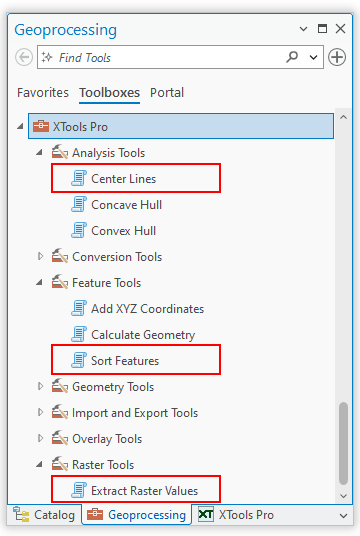
As well, more geoprocessing tools have been added to the XTools Pro toolbox in ArcGIS Pro - Center Lines, Sort Features, Shapes to Centroids and Extract Raster Values.
The new XTools Pro 26 version is rebuilt with .NET 10 for use with ArcGIS Pro 3.7.
What’s new in XTools Pro 26 for ArcGIS Pro
Support for ArcGIS Pro 3.7
XTools Pro 26.0 is rebuilt with .NET 10 for use with ArcGIS Pro 3.7.
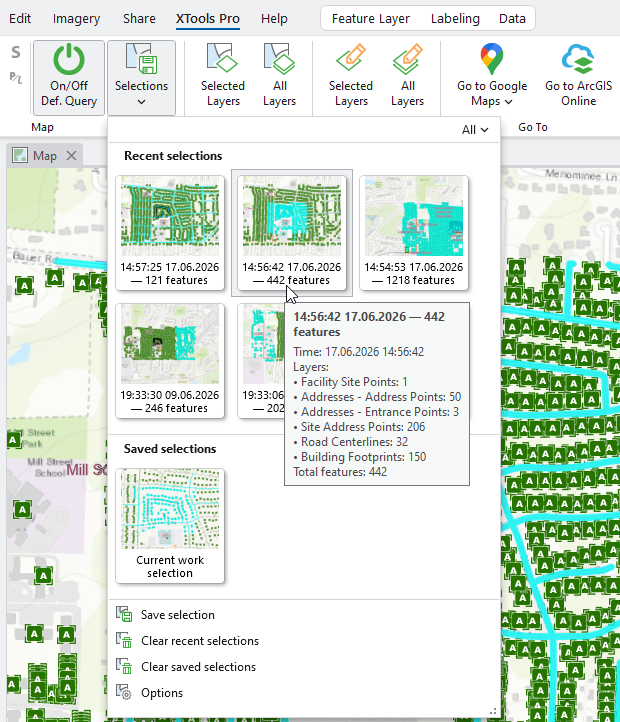
Selection Manager
- New tool to save feature selections and switch between saved selections.
- New option to restore feature selections.
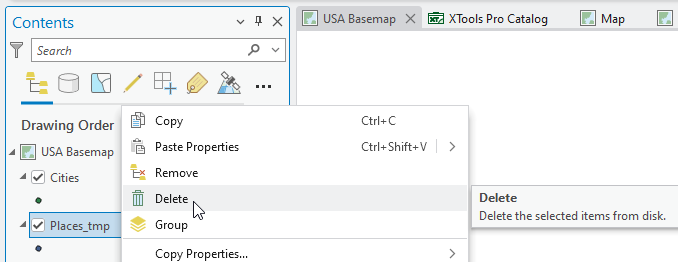
Delete
New feature to permanently delete datasets from disk right from the layer context menu in the Contents pane.
New Geoprocessing Tools
The following new tools have been added to the XTools Pro toolbox in ArcGIS Pro:
- Center Lines
- Sort Features
- Shapes to Centroids
- Extract Raster Values
Export to KML
- Metadata descriptions are now exported as KML descriptions.
- Domain and subtype descriptions can be exported to KML files.
- Random colors are assigned to the output features for datasets selected from Catalog.
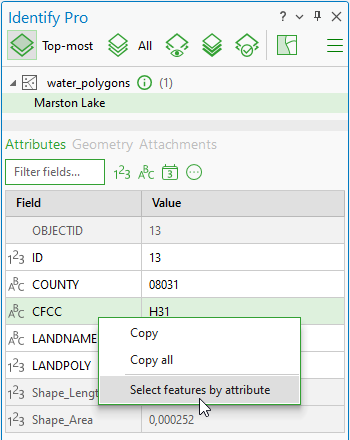
Identify Pro
New option to select features by attribute values from the Identify Pro window.
Other changes
- XTools Pro 26.0 is provided for use with ArcGIS Pro 3.7 version.
- Fixed performance issues when switching between layers.
- Updated user interface.
- Minor bug fixes and enhancements.